
EcoNet
Rheem ManufacturingHouse & Home
4.05.00K Reviews
- Version
- 6.18.0-11550-3100206
- Installs
- 100.00K
- Age Rating
- Everyone
Screenshots
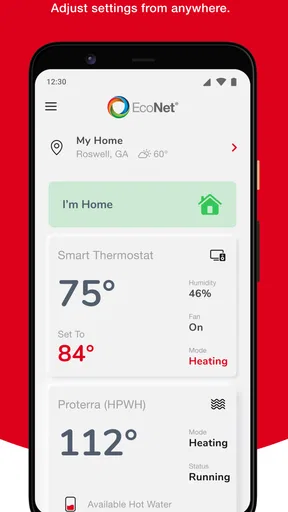
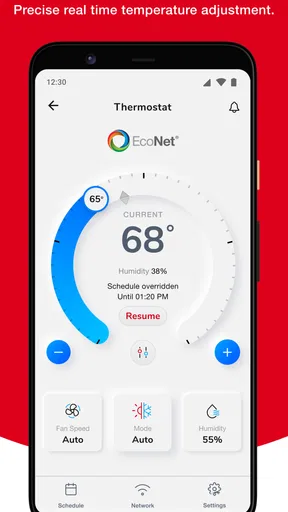
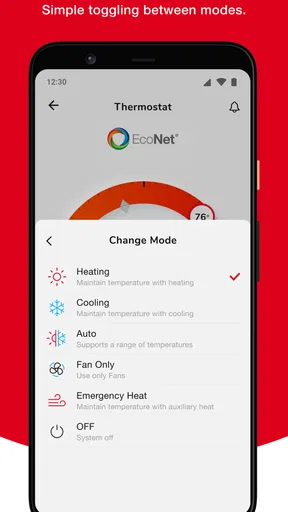
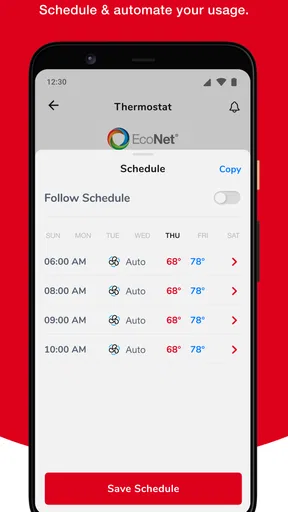
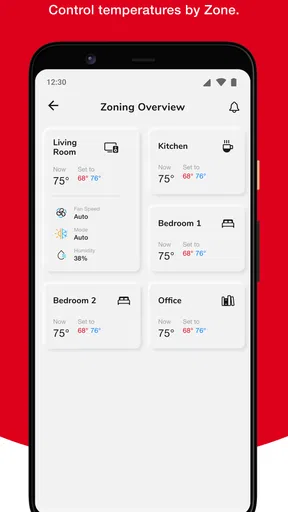
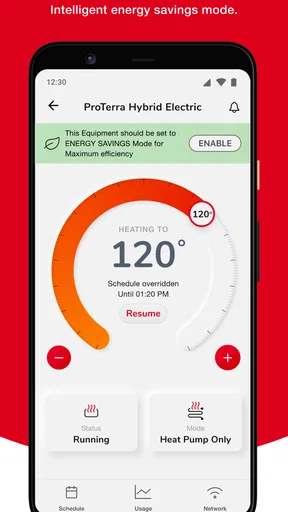
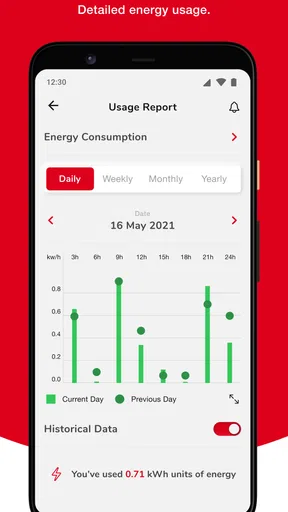
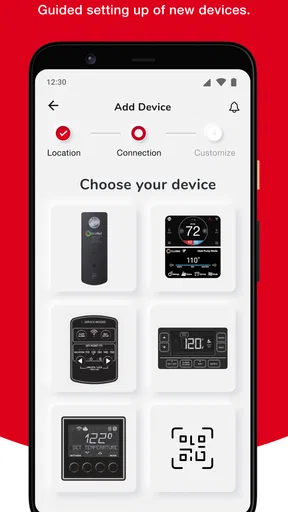
Our Review of EcoNet
 Analysis by Appyee
Managing heating, cooling, and hot water is usually something I notice only when it stops working well. That is where EcoNet makes a useful first impression. Rheem Manufacturing’s House & Home app puts smart control of compatible Rheem-brand HVAC equipment and water heaters in one mobile place, so I can check the systems I rely on without walking to a thermostat or utility area. It is free, rated for Everyone, and feels aimed at ordinary household control rather than technical users.
After using it, my view is fairly simple: EcoNet is most valuable when it becomes part of a routine. The novelty of changing a setting from a phone wears off quickly, but the ability to make small adjustments before bed, before leaving home, or when the weather changes can remain worthwhile. The important condition is compatibility. This is not a universal smart-home remote, and it is not a replacement for every thermostat or water-heater control. Its usefulness depends heavily on whether the Rheem equipment in your home can work with it.
What EcoNet feels like during the first week
The first-week appeal comes from convenience rather than visual excitement. I can think about comfort in terms of the home instead of a particular wall-mounted control. If I am already carrying my phone, opening the app is often easier than finding the thermostat, especially when I am upstairs, in bed, or arriving home with my hands full.
The app’s purpose is clear: it connects consumers with compatible Rheem HVAC and water-heating equipment. That focused approach is a strength. I am not sorting through unrelated smart-home gadgets or a crowded collection of entertainment controls. The experience is centered on the systems that affect temperature and hot water, which makes the app easier to understand than a broad home-automation platform when all I want is a practical adjustment.
EcoNet is available at no cost, which lowers the barrier to trying it. The current version is 6.17.0-10941-0de1f09, and the app has been available since June 2, 2014. Those details matter less than the day-to-day result, but they show that this is an established Rheem control product rather than a newly launched experiment. Its audience is also broad: the Everyone age classification makes sense for a household tool that does not depend on mature content or specialized professional knowledge.
One of the first habits I would recommend is checking the app while standing near the equipment during setup or initial testing. That makes it easier to tell whether a change in the app is reflected by the physical system and helps avoid guessing later. I would also make a note of the normal settings that feel comfortable in the home. Without that baseline, it is easy to make frequent small changes and then lose track of which setting actually helped.
The first week can also reveal whether remote control is genuinely useful in your household. Someone who regularly forgets to adjust the temperature before leaving may appreciate the phone-based access immediately. A family with different comfort preferences may value the ability to check the system without interrupting another person. On the other hand, if the thermostat is already easy to reach and nobody changes settings, EcoNet may feel like an extra step rather than an improvement.
Where the convenience is most noticeable
A realistic example is a cold evening when I am already in bed and realize the home is not as comfortable as expected. With a conventional setup, I would need to get up, find the control, and decide whether the change was worth the interruption. With EcoNet, I can make the adjustment from the phone. That is not a dramatic transformation, but repeated small moments like this are what determine whether a smart-home app earns a permanent place on the device.
The same logic applies to water heating. I may not need to interact with that equipment every day, but having its control alongside HVAC functions can make the app more useful than a single-purpose thermostat application. It creates one destination for the Rheem systems that matter most to household comfort. The trade-off is that this benefit is strongest for homes with more than one compatible Rheem system; otherwise, the app’s scope may feel narrower.
I would not install EcoNet expecting it to replace a professional diagnosis. A phone interface can make control more convenient, but it does not turn a household user into an HVAC technician. If the system behaves strangely, comfort remains poor, or hot water is unreliable, the app should be treated as a control and monitoring aid rather than proof that the underlying equipment is healthy.
Why the value either lasts or fades after the novelty
Remote control is exciting for a few days because it is easy to demonstrate. Long-term value is different. After the first week, I stop opening the app simply to see what it can do. I return when it helps me make a decision or avoid an inconvenience. That makes EcoNet a habit-based tool: its lasting usefulness depends on whether it fits naturally into routines already connected to leaving, arriving, sleeping, and preparing the home.
For month-to-month use, I find the strongest case is seasonal adjustment. HVAC needs change as outdoor conditions shift, and a setting that felt right last month may not feel right now. EcoNet gives me a convenient place to make those changes without treating every adjustment as a trip to the equipment. The app is especially sensible for people who travel between rooms, have difficult-to-reach controls, or want to check the home while away.
There is also a useful distinction between frequent control and occasional reassurance. Some users will open EcoNet several times a week because they actively manage comfort. Others may use it only when leaving for a trip or returning home. Occasional use is not a failure if the app reliably solves that specific problem. In fact, a tool that saves effort during a handful of inconvenient situations can be worthwhile even when it is not part of a daily routine.
My practical tip is to connect app use to an existing habit instead of trying to create a new one. For example, I would check the HVAC setting when locking the door, review it before going to sleep, or use the water-heater control as part of a travel checklist. This is more sustainable than opening the app randomly. The goal is not to interact with smart equipment constantly; it is to make the right adjustment at the moments when it matters.
How it compares with ordinary alternatives
A traditional thermostat remains better for immediate, tactile control. It is always in the same place, does not depend on finding a phone, and is easy for visitors or household members who do not want another app. If your main need is simply changing the temperature while standing in the room, a physical control may be faster.
A dedicated thermostat app can also be a better choice when your home uses equipment from another manufacturer or when you want a broader ecosystem around one thermostat brand. EcoNet’s advantage is not universal compatibility; it is the direct relationship with compatible Rheem HVAC and water-heating equipment. That focus is valuable when your equipment matches it, but limiting when your home is built around mixed brands.
A general smart-home platform may offer more cross-brand automation, but it can also introduce more menus and more points of confusion. EcoNet is the more focused option for a Rheem household that wants control rather than a large automation project. I would choose the broader platform only when controlling lights, locks, sensors, and other brands is more important than keeping HVAC and water heating straightforward.
The app has a 4.0 average from around 11 thousand ratings, with roughly 5 thousand written reviews and over 100 thousand installs. Those figures suggest a meaningful user base and a generally positive reception, but they do not guarantee that every home will have the same experience. Compatibility, equipment configuration, network conditions, and personal habits can matter more than a store average for a control app.
The maintenance burden behind a simple control app
EcoNet is not the kind of app that demands constant attention, but it does add another layer to household maintenance. I have to keep the app available, remember how it fits into the home’s routines, and be comfortable using it alongside the physical equipment. If a phone is replaced, household access changes, or the home’s equipment is updated, the control arrangement may need attention again.
The best way to keep the experience manageable is to avoid treating the app as the only way to operate the systems. Everyone in the home should still know where the physical controls are and how to use them. That matters during a phone problem, a forgotten login, or any situation where the app is inconvenient. Smart control should make the household more flexible, not create a single point of dependence.
I also recommend deciding in advance which adjustments are routine and which should be left alone. Changing comfort settings is one thing; attempting to solve an equipment problem through repeated app commands is another. If a system does not respond as expected, repeatedly tapping controls can create confusion about what the equipment is actually doing. A short pause to check the physical system and the household conditions is often more sensible than making several rapid changes.
Another non-obvious trade-off is shared control. A phone-based system is convenient when one person manages the home, but less simple when several people have different expectations. Before relying on EcoNet, a household should agree on sensible temperature and hot-water habits. Otherwise, the app can make disagreements easier to act on rather than easier to resolve. The technology does not remove the need for a shared routine.
For renters or people living in homes with equipment they did not choose, the app may also be less attractive. The value comes from a continuing relationship with compatible Rheem systems. If you expect to move soon, rarely control the HVAC, or cannot influence the equipment setup, the effort of learning a dedicated app may not pay off. In that situation, the existing thermostat or the property manager’s preferred method may be the better option.
Small habits that improve the experience
I would begin with conservative changes rather than dramatic ones. Make one adjustment, wait long enough to judge the comfort, and then decide whether another change is needed. This keeps the app from becoming a source of constant fiddling and makes it easier to recognize the settings that work for the home.
I would also use the app to support a written or mental routine, not to replace common sense. Before leaving for several days, review the household’s comfort and water-heating settings in the same way you would check doors and appliances. When returning, restore the preferred routine gradually instead of making several changes at once. These habits make remote control useful without turning it into another task that needs daily supervision.
Finally, keep the physical location of the equipment familiar. EcoNet is most helpful when it complements awareness of the home. If I know where the thermostat and water heater are, I can compare what the app shows with what I see and hear in the house. That simple cross-check is more useful than assuming a phone screen tells the entire story.
Where fatigue can set in
The biggest source of fatigue is the gap between occasional convenience and repeated interaction. If the home is already comfortable, I may have little reason to open EcoNet. A smart control app can be well designed and still become invisible when it is not solving an immediate problem. That is normal, but it means the app’s value should be judged by useful moments, not by how often it is opened.
Another possible frustration is expecting a broad smart-home experience from a focused Rheem tool. Someone looking for extensive cross-brand routines, a single control center for every appliance, or elaborate automation may find EcoNet too narrow. The app’s focus helps it stay relevant to Rheem HVAC and water-heating control, but that same focus makes it a poor fit for people who want one platform to manage an entire connected home.
There is also a learning curve around responsibility. Remote access can encourage me to think that every comfort issue should be fixed with a setting change. That is not always true. A poorly placed thermostat, an unusual room temperature, a maintenance issue, or a problem with the equipment may require a different response. EcoNet is useful for making a control decision; it is not a substitute for understanding when the equipment needs attention beyond the app.
I would skip it if I did not own or use compatible Rheem equipment, if I strongly preferred physical controls, or if I wanted a platform built around many unrelated smart devices. I would also hesitate if nobody in the household is willing to maintain a shared routine. The app cannot create value from equipment that users never adjust, and it cannot make incompatible hardware part of the Rheem system.
For the right household, however, the limitations are reasonable. The app does not need to be opened constantly to justify itself. Its strongest role is quiet and practical: making a remote adjustment less inconvenient, bringing HVAC and water-heating control closer together, and helping a Rheem owner manage comfort with fewer trips around the house.
Does EcoNet deserve lasting space?
My long-term verdict is positive, with a clear qualification: EcoNet earns lasting space when it is connected to a real household habit. I would keep it installed for a home using compatible Rheem HVAC or water-heating equipment, particularly where the controls are inconvenient to reach or where comfort settings change with schedules and seasons. In that context, the app’s free price and focused purpose make the decision easy.
I would not keep it merely because remote control sounds impressive. After the novelty fades, the app has to save time or reduce small frustrations. If it does that before bed, at the door, during travel, or when managing different parts of the home, its value becomes recurring rather than decorative. If it only duplicates a nearby thermostat that nobody touches, it may not deserve attention or storage space.
Rheem Manufacturing has made EcoNet a straightforward consumer-facing option rather than an all-purpose home-control system. That is both its identity and its boundary. I appreciate the narrower focus because it keeps the app relevant to HVAC and water heating, but I would choose a different solution for mixed-brand automation or for a home where a physical control already handles everything comfortably.
The most useful question before installing it is not “Can I control my home from my phone?” It is “Which repeated inconvenience will this remove?” If the answer is clear, EcoNet is worth trying. If there is no answer beyond curiosity, the first-week appeal may disappear quickly. For Rheem owners who want practical access and are willing to keep a simple routine, EcoNet is a sensible household companion, not a gadget that needs constant attention.
That balance is why I would recommend it to a friend with compatible Rheem equipment, while setting expectations honestly. Use it as a convenient layer over normal household control, keep the physical controls familiar, and let real routines determine its place. When used that way, the app can remain useful long after the novelty of smart-home control has worn off.
Privacy and Permissions
See what permissions an app requests and how it handles your data.
- Location
- approximate location (network-based), precise location (GPS and network-based)
- Phone
- directly call phone numbers
- Camera
- take pictures and videos
- Wi-Fi connection information
- view Wi-Fi connections
- Other
- view network connections, pair with Bluetooth devices, access Bluetooth settings, change network connectivity, connect and disconnect from Wi-Fi, full network access, run at startup, control vibration, prevent device from sleeping
Verdict
Strengths of EcoNet
- Helps users monitor and reduce household energy consumption.
- Provides practical tips for adopting more sustainable daily habits.
- Clean interface makes key environmental information easy to find.
- Can encourage long-term savings by highlighting inefficient energy use.
- Useful for environmentally conscious users tracking their personal impact.
Limitations of EcoNet
- Some features may depend on compatible smart meters or connected devices.
- Energy estimates may vary when usage data is incomplete or delayed.
- Limited usefulness for users without access to local energy information.
- Frequent tracking can feel demanding for users seeking a set-and-forget app.
- Privacy settings should be reviewed before connecting personal utility data.
Similar Picks in This Category
View All
Universal TV Remote Control
CodeMatics Media Solutions3.9

AlfredCamera Home Security app
Alfred Systems Inc.4.7

Planner 5D: AI Home Design
Planner 5D4.5

Universal Tv Remote-Cast to TV
One Music Player4.1

Zillow: Homes for Sale & Rent
Zillow Group4.8

99acres Buy/Rent/Sell Property
infoedge.com4.3
Frequently Asked Questions
What is EcoNet and what can I use it for?
EcoNet is a digital platform designed to help users access and manage eco-friendly services, information, or community features from one place. Depending on the version available in your region, it may include environmental tips, sustainability tools, recycling information, energy-related resources, or ways to participate in green initiatives. Before downloading, check the app’s official description to confirm which features are supported in your country.
Is EcoNet free to download and use?
EcoNet may be available as a free download, but some features or services could require registration, in-app purchases, subscriptions, or access through a participating organization. After installing the app, review the pricing information carefully before activating any premium option. It is also worth checking whether mobile data charges apply when using location services, online content, account synchronization, or other connected features.
What permissions does EcoNet request?
The permissions requested by EcoNet can vary according to the features enabled on your device and the version installed. The application may ask for access to notifications, location, camera, storage, or account information if these are needed for specific tools. We recommend reading each permission prompt instead of approving everything automatically. You can usually change permissions later through your Android or iOS privacy settings.
Does EcoNet require an account or an internet connection?
Some EcoNet functions may be accessible without creating an account, while personalized tools, saved preferences, reports, participation features, or synchronization may require registration. An internet connection is generally needed to download updated content, submit information, use online services, or communicate with the platform. Offline availability can differ by feature, so users should not assume that every part of EcoNet will work without mobile data or Wi-Fi.
Is EcoNet safe and suitable for my device?
EcoNet should be downloaded only from the official Google Play Store or Apple App Store to reduce the risk of counterfeit or modified versions. Before installing, verify the developer name, recent updates, user reviews, privacy policy, and required operating-system version. The app may collect certain technical or account-related information, so review its privacy details carefully. Also make sure your device has enough storage and uses a supported Android or iOS version.
